



Results for "how do i sign up for edocuments"
-
FAQ
How much can I borrow with a Home Equity Line of Credit (HELOC)?
You can typically borrow up to 80% of your home's value, minus what you still owe on your first mortgage.
For example, if your home is valued at $120,000 and your mortgage balance is $27,000, you could potentially qualify for a HELOC of around $69,000.
Keep in mind that this is a general estimate. Your actual limit may vary based on factors like credit, income and overall equity.
Need more than 80% loan-to-value (LTV)? We may still be able to help. Contact us to review your options. -
FAQHow can I add a sub-user to Business Digital Banking?
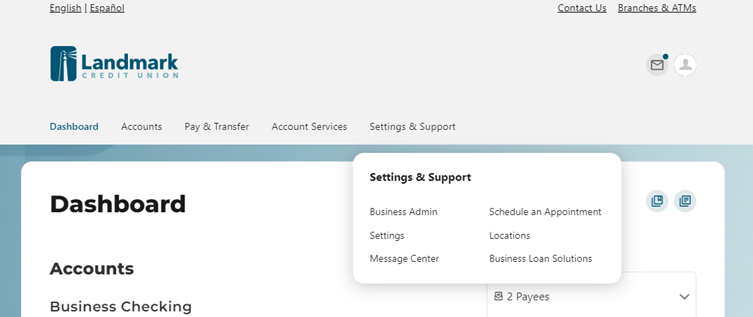
You can easily add a Sub-User by following these steps:
- Locate "Settings & Support" in the top navigation.
- Select "Business Admin."
- Select Users
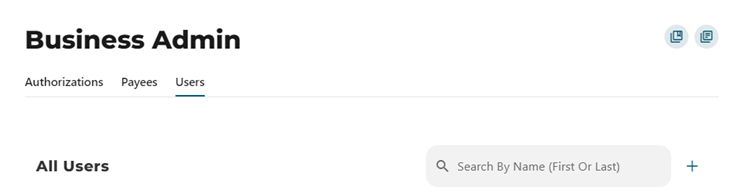
- Under the Users section, look for the "+" symbol. Click to initiate the process of adding a new user.
- Create a New User: This option will guide you through setting up the new user's access rights step by step.
- Copy an Existing User: If you already have a user with the desired access rights, you can copy their settings to the new user.
If you need further assistance with Business Digital Banking, contact us.
-
FAQ
How do I deposit a check into my Landmark account if I live outside Wisconsin?
You have two convenient options for depositing a check into your Landmark account.
Option 1: Use Mobile Deposit (Recommended)
Log in to Digital Banking and deposit your check securely using the Landmark mobile app. It’s fast, easy, and can be done from anywhere! Don’t have the app, download it now.


Option 2: Mail Your Check
If you prefer to mail your deposit, include your account number on the memo line and send it to:
Landmark Credit Union
P.O. Box 510870
New Berlin, WI 53151-0870
If you have any questions about depositing checks contact us. -
FAQ
I would like to make an extra principal payment on my mortgage. How do I ensure the payment goes to principal only?
If you have made your regular monthly payment, you may make a separate payment to principal only within the same billing cycle. Alternatively, you can add the additional amount that you'd like applied towards principal to your regular mortgage payment and indicate how the additional amount should be applied.
Please indicate your request in the memo portion of your check or notify the teller handling your transaction in the branch, or choose the principal only option through Digital Banking. -
News/Blog
How Construction Loans Work
Read More